
🎤 Speech Generation Setup
1. Select a Speech Provider
- Navigate to the Voice Setup page in your TIXAE dashboard.
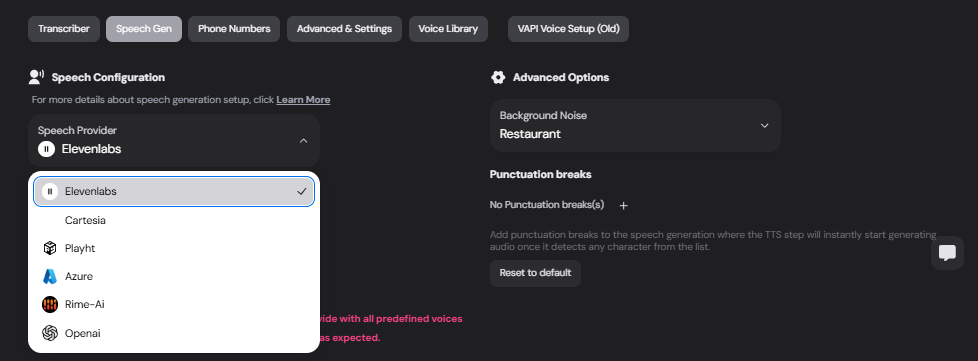
- Click on the Speech Gen tab.
- From the Speech Provider dropdown, select your preferred provider:
- ElevenLabs is currently supported.
2. Choose a Voice
- Under the ElevenLabs Audio Library, available voices are listed.
- Browse through the options and preview each voice.
- Use the play button to listen to a sample.
- Adjust playback speed (e.g.,
1x,1.5x).
- Click “Use Voice” to select a voice for your setup.
Available Voices:
- Marcus - Authoritative and deep
- Sam - Chill, Southern California Male
- Ali - Versatile and neutral
- Lisa - Gentle, calm
- Jessi - Neutral tone
- Mimi - Soft and expressive
3. Advanced Options
Configure additional settings for speech generation:🔊 Background Noise
Add environmental noise to simulate real-world settings.- Options include:
- Restaurant
- Office
- Quiet Environment
✍️ Punctuation Breaks
- Add pauses in the generated speech whenever punctuation (e.g.,
,or.) is detected. - Click ”+” to customize punctuation rules.
Reset to default settings if needed using the “Reset to default” button.
📝 Text-to-Speech Example
Here’s an example workflow for Speech Generation:- Input Text: “Hello, how are you?”
- Selected Voice: Sam - Chill, Southern California Male
- Generated Speech: A natural-sounding voice plays the input text with optional background noise.
⚙️ Troubleshooting
Voice Not Showing?
- Ensure your ElevenLabs API key is valid and configured correctly.
Speech Playback Delays?
- Check your network connection.
- Reduce background noise for faster processing.
🔗 Next Steps
Transcriber Configuration
Convert user speech into text.
Advanced Settings
Explore call recording, routing, and other configurations.